
Modern Data Platforms Powered by SAP Integration
We specialize in building robust data platforms on SAP, cloud, and open-source ecosystems. Our innovative replication tool seamlessly integrates and transfers SAP data into modern cloud data platforms like Snowflake or Databricks, empowering businesses to harness actionable insights with ease with No-Code and 1-Click setup. Leverage our expertise to transform your data landscape and drive smarter decision-making. Let us help you bridge the gap between SAP and the cloud.
Trial Installation Request
Request for Trial Installation
Trial Installation
"*" indicates required fields
Demo Request
Request for Product Demo
Demo Request
"*" indicates required fields


Managed by External Scheduler
The triggering of a replication process is done through the execution of a docker image that accepts the login credentials to the SAP system, which triggers the data replication. This docker image can be run locally or in cloud and can be attached to most orchestration tools with ease. The docker image is part of the standard delivery package.

Managed by SAP BW Scheduler
If a customer would like to have an orchestration-free setup, we offer the possibility to transfer the data to targets like Snowflake and Databricks directly. Snowflake/Databricks will be configured to poll the new data. All API artefacts needed for the communication between SAP, Databricks or Snowflake are part of the standard delivery package.

Performance Metrics
Performance is influenced by the size of the records and the level of parallelization, which depends on the specific customer scenario. For instance, with a record size of 600 characters and 5 parallel jobs, it is possible to transfer approximately 100 million records in several minutes.

Data Security
dbReplika by design ensures that data never leaves the networks and systems of the customer. dbReplika runs as an SAP Add-on in the customer on-premise or SAP Private Cloud SAP system and doesn’t need any cloud subscription.

Configuration
The dbReplika GUI allows users to activate a datasource for replication in less than a minute!
-
 Low-code & No-code reduced development costs
 -
Low entry barrier for new team members
-
Ease of knowledge Transfer

Delta
dbReplika uses the standard BW Delta frameworks, thereby ensuring an SAP compliant delta by design!
-
All ODP Delta Datasources supported
-
Custom delta extractors supported
-
Recovery of prior delta states of requets

Filters
DTPs can be configured for partial replication of data by using the standard DTP filter capabilities!
-
Standard DTP filters are supported
-
DTP routines as filters are supported
-
Custom filter logic supported
| Feature Matrix | dbReplika | Other Vendors |
|---|---|---|
| 1-Click replication setup |  Yes Yes |
 No No |
| Low-Code / No-Code | Yes |
 Partially Partially |
| Cost efficient | Yes |
No |
| Usage based pricing | Low |
High |
| Hidden follow up costs | No |
Yes |
| Replication performance | Fast |
Slow |
| Transfer method | Highly optimized |
oData, RFC, JDBC, ODBC |
| S3 support | Yes |
Partially |
| CDS View support | Yes |
Partially |
| Custom datasource support | Yes |
No |
| SAPI datasource support | Yes |
No |
| ODP datasources support | Yes |
Violating SAP Note 2814740 |
| HANA DB Log usage | Not needed |
Violating SAP Note 2814740 |
| Database trigger | Not needed |
Violating SAP Note 2814740 |
| Middleware needed | Not needed |
Partially needed |
| SSH connection needed | Not needed |
Partially needed |
| SAP BTP Cloud | Not needed |
Partially needed |
| SAP® Datasphere | Not needed |
Partially needed |
| SAP Cloud connector | Not needed |
Partially needed |
| SAP Java connector | Not needed |
Partially needed |
| SAP JDBC / ODBC Adapter | Not needed |
Partially needed |
| External scheduler | Optional |
Partially needed |
| BW scheduler support | Yes |
No |
| Databricks ETL content | Inbound Stage |
None or outdated |
| Databricks Notebooks | Supported |
Partially |
| Databricks Job support | Supported |
Partially |
| Snowflake ETL content | Inbound Stage |
None or outdated |
| Snowflake Notebooks | Supported |
Partially |
| Snowflake Stage | Supported |
Partially |
| Snowflake Snowpipe | Supported |
Partially |
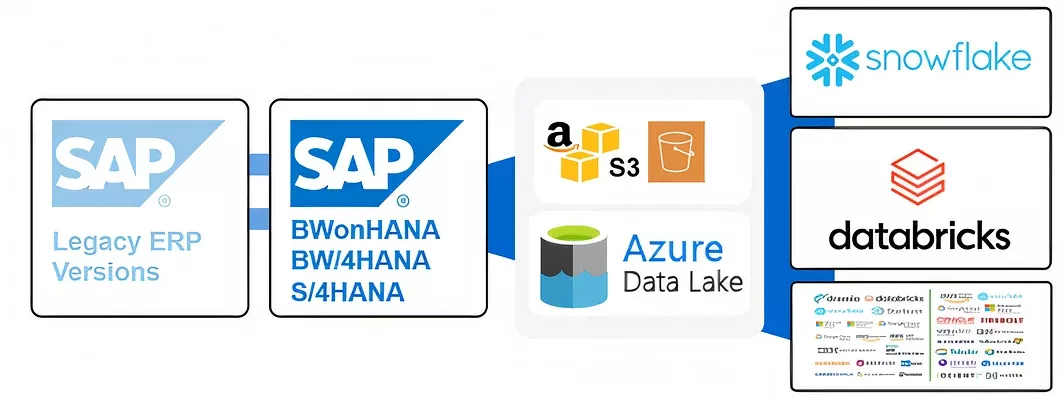

Source Systems
-
SAP BWonHANA® >= 7.5
-
SAP S/4HANA® >=1709
-
SAP BW/4HANA®

Source Type
-
Datasources (BW, ODP, SAPI, CDS Views)
-
Composite Provider & ADSO
-
Custom Tables via CDS Views

Target Systems
-
Snowflake
-
Databricks
-
Other vendors on request

SAP Note 2814740
Database triggers in ABAP Dictionary
Database triggers cannot be created or managed in the ABAP Dictionary. Despite this, triggers are taken into account or handled in the case of table changes. The ABAP Dictionary distinguishes between manageable and non-manageable triggers.
Operations that cannot be handled:
-
The addition or deletion of a primary key column
-
Centralized oversight of all business rules operating in the system

SAP Note 3255746
Unpermitted usage of ODP Data Replication APIs
-
The usage of RFC modules of the Operational Data Provisioning (ODP) Data Replication API is NOT permitted by SAP by customer, or third-party applications to access SAP ABAP sources (On-Premise or Cloud Private Edition)
-
Such modules are only intended for SAP-internal applications and may be modified at any time by SAP without notice.
-
Any and all problems experienced or caused by customer or third-party applications (like MS/Azure) using RFC modules of the Operational Data Provisioning (ODP) Data Replication API are at the risk of the customer and SAP is not responsible for resolving such problems.

SAP Note 2971304
SAP has not certified any supported interfaces for redo log-based replication
-
SAP has not certified or offered any supported interfaces in the past for redo log-based information extraction out of SAP HANA’s persistence layer (log volumes as well as log backups in files or external backup tools).
-
To be clear, there is no published or ever existed API for the redo-log information extraction by SAP or any similar planned functionality in the current roadmap for SAP HANA and SAP HANA Cloud!
-
Any solution on the market is consequently based on 3rd-party reverse engineering of redo-log (transactional log) functions of SAP HANA outside of SAP reach.

Performance Bottlenecks
-
SAP table locking during extraction
-
Network bandwidth limitations during large data transfers
-
Resource contention in production environments
-
Slow processing of wide tables with numerous columns

Data Consistency Issues
-
Handling complex SAP data types and conversions
-
Maintaining referential integrity across tables
-
Managing delta changes in clustered tables
-
Synchronizing data across different time zones

Operational Complexities
-
Complex SAP authorization requirements
-
Limited extraction windows during business hours
-
High memory consumption during full loads
-
Monitoring and alerting across multiple systems

Integration Hurdles
-
SAP module-specific extraction logic
-
Custom ABAP code compatibility
-
Pool and cluster table replication
-
Handling of SAP buffer synchronization

Cost Management
-
Snowflake compute costs during large loads
-
Storage costs for historical data versions
-
Network egress charges
-
Development and testing environment expenses

Best Practices
-
Implement incremental loading where possible
-
Use parallel processing for large tables
-
Schedule resource-intensive loads during off-peak hours
-
Optimize table structures and indexes
-
Regular monitoring and performance tuning

Performance Issues
-
SAP extractor performance limitations
-
High latency during peak business hours
-
Memory pressure during large table processing
-
Slow processing of hierarchical data structures

Architecture Complexities
-
Delta Lake table optimization challenges
-
Cluster configuration for varying workloads
-
Managing schema evolution
-
Handling of concurrent write operations

Data Quality Concerns
-
ABAP data type conversion challenges
-
Maintaining data lineage
-
Complex transformation logic validation
-
Handling of SAP null values and special characters
Operational Challenges
-
Job orchestration across environments
-
Resource allocation for multiple workloads
-
Managing compute costs for large datasets
-
Monitoring distributed processing tasks
Integration Hurdles
-
SAP connector stability issues
-
Authentication and authorization complexity
-
Network security configuration
-
Managing CDC (Change Data Capture) failures
Best Practices
-
Implement auto-scaling policies
-
Use optimized file formats (Delta/Parquet)
-
Set up proper partitioning strategies
-
Deploy robust error handling mechanisms
-
Establish clear SLAs for data freshness